Without the pluginYou retype order lines and customer details into FreeAgent, one order at a time.
With the pluginThe invoice is created from the order's own data, with the contact matched by email address.
WooCommerce plugin · connects to FreeAgent over the official OAuth API
The plugin connects your WooCommerce shop to FreeAgent. It creates an invoice from each order, keeps FreeAgent contacts in step with billing details and puts the PDF on the order for you and your customer. With PRO, invoices, credit notes and payments are handled automatically when order statuses change, with no manual work.
PRO needs the FREE plugin, which you download at no cost. You connect FreeAgent only once.
 100% 5-star reviews
Trusted by over 1,000 website owners
100% 5-star reviews
Trusted by over 1,000 website owners
Before you start reading
FreeAgent WooCommerce is a WordPress plugin from Devikit that connects a WooCommerce shop to FreeAgent, the UK cloud accounting software, over the official OAuth API. The invoice is created in FreeAgent from the order's data, and the order keeps the invoice number, a PDF and a link to the invoice.
The plugin comes in two versions. FREE creates invoices manually from the order screen, matches or creates FreeAgent contacts, reads VAT per line and adds a VAT number field at checkout. PRO is a paid add-on that needs FREE: it adds invoice automation on order status, credit notes for refunds, a daily rollup mode, automatic payment recording, emails with the PDF attached, bulk actions and EC VAT MOSS.
Looking for a WooCommerce FreeAgent integration for a UK shop, or one that sells to EU customers? Below you will find the features, real screenshots, pricing, a comparison with the other plugin on the market and answers to the most common questions.
Why this plugin
FreeAgent has no WooCommerce connector that you switch on inside its own dashboard. The connection runs through a plugin installed in your shop, which is where the order, the billing details, the tax settings and the refunds already live.
Without the pluginYou retype order lines and customer details into FreeAgent, one order at a time.
With the pluginThe invoice is created from the order's own data, with the contact matched by email address.
Without the pluginYou check the VAT after the invoice exists and correct it by hand.
With the pluginVAT is read per line from your WooCommerce tax settings, and the EC status follows the billing country.
Without the pluginYou and your customer both hunt for the invoice PDF inside FreeAgent.
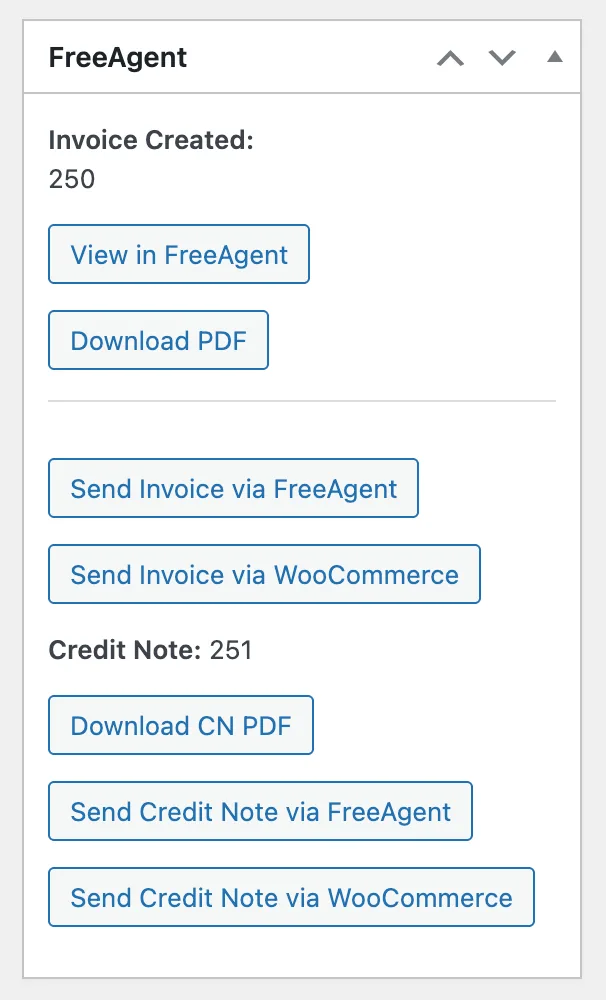
With the pluginThe number, a link to FreeAgent and the PDF sit on the order, and customers download their invoices in My Account.
How it works
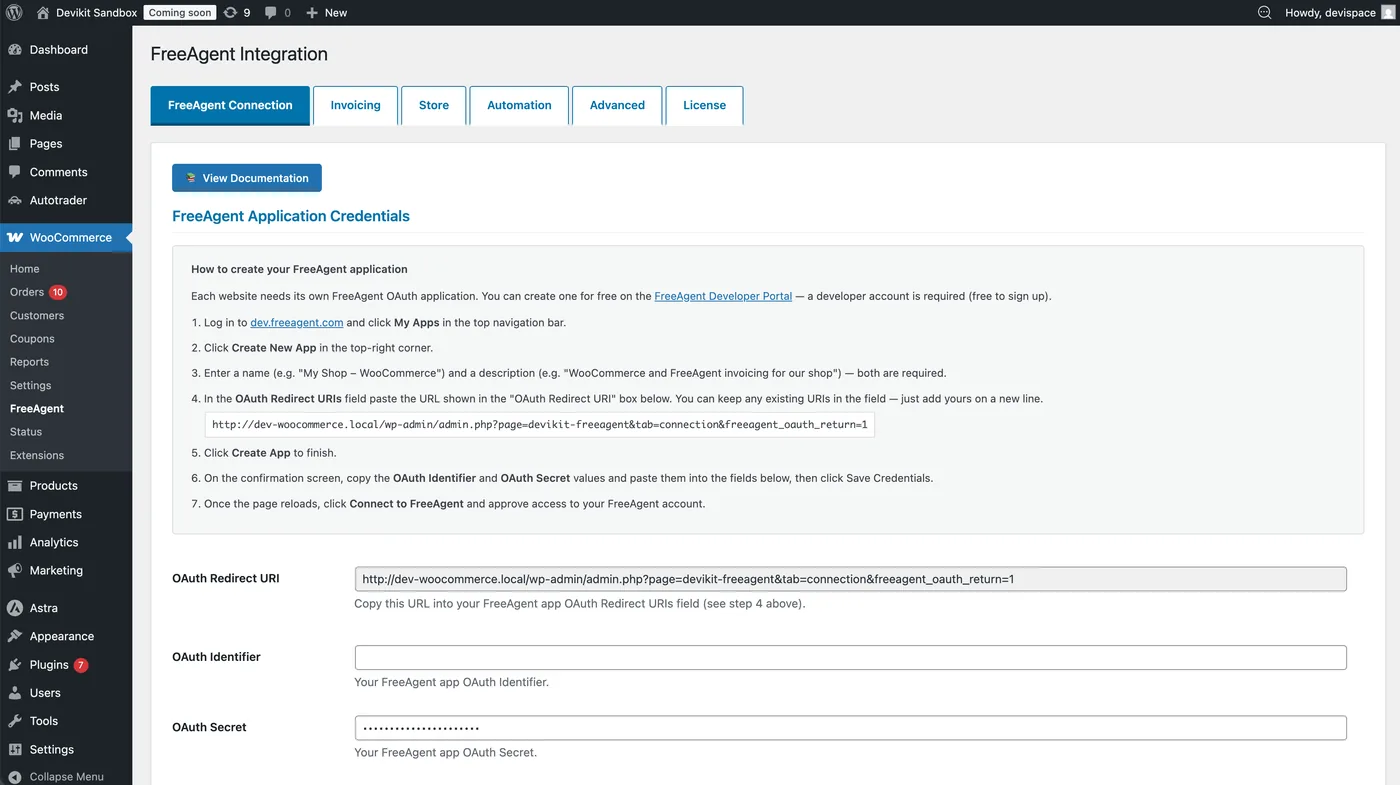
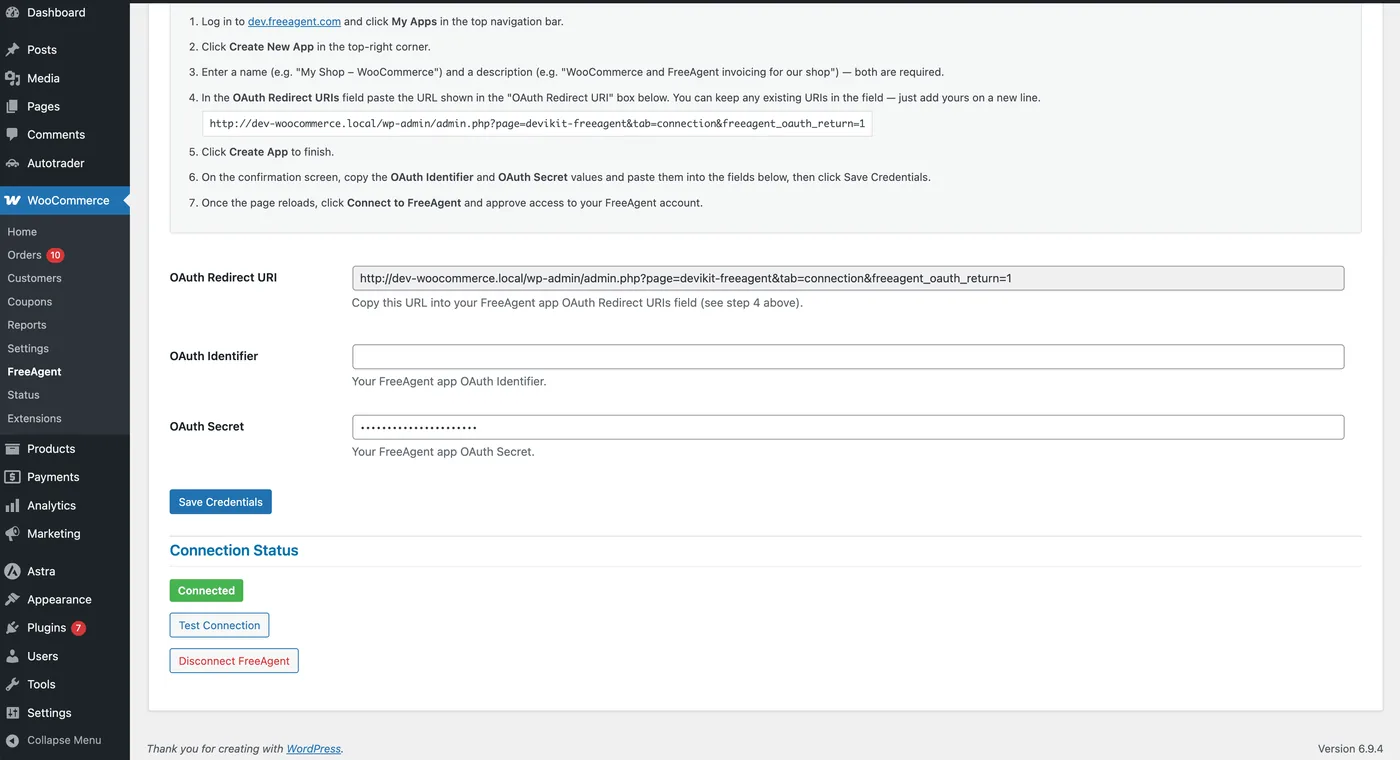
You create a free developer app at dev.freeagent.com, paste the Redirect URI shown in the plugin into it, and copy the OAuth Identifier and Secret back. The Test Connection button confirms the link works.
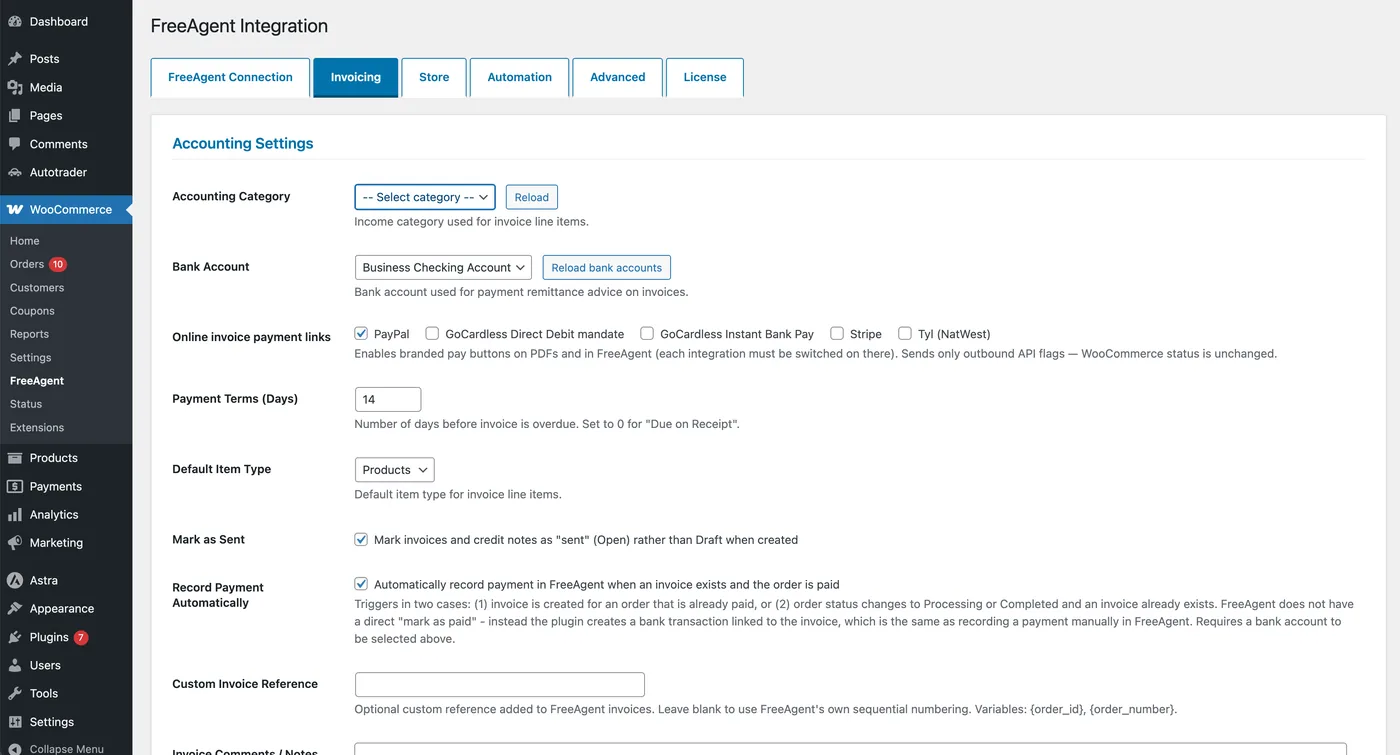
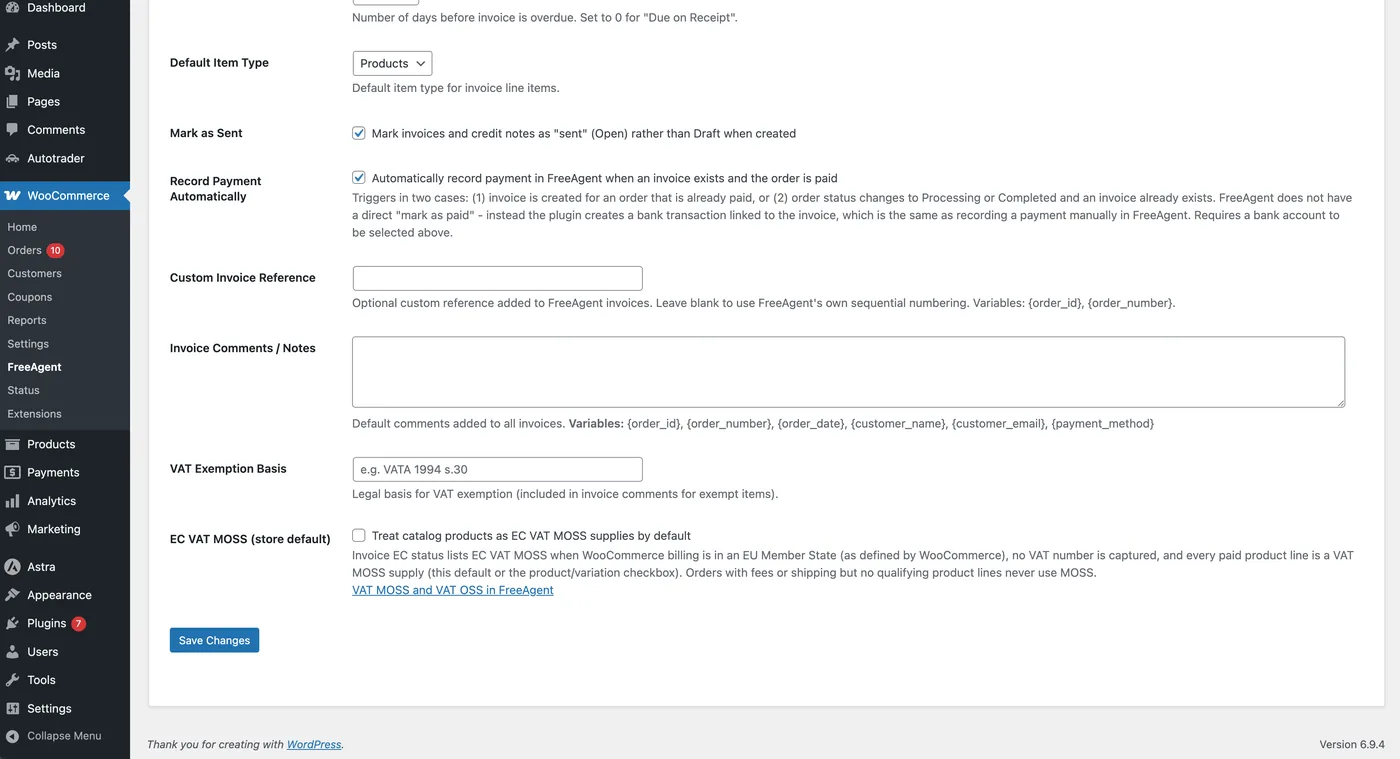
Choose the bank account, payment terms and default invoice notes, and decide how the VAT number field behaves at checkout.
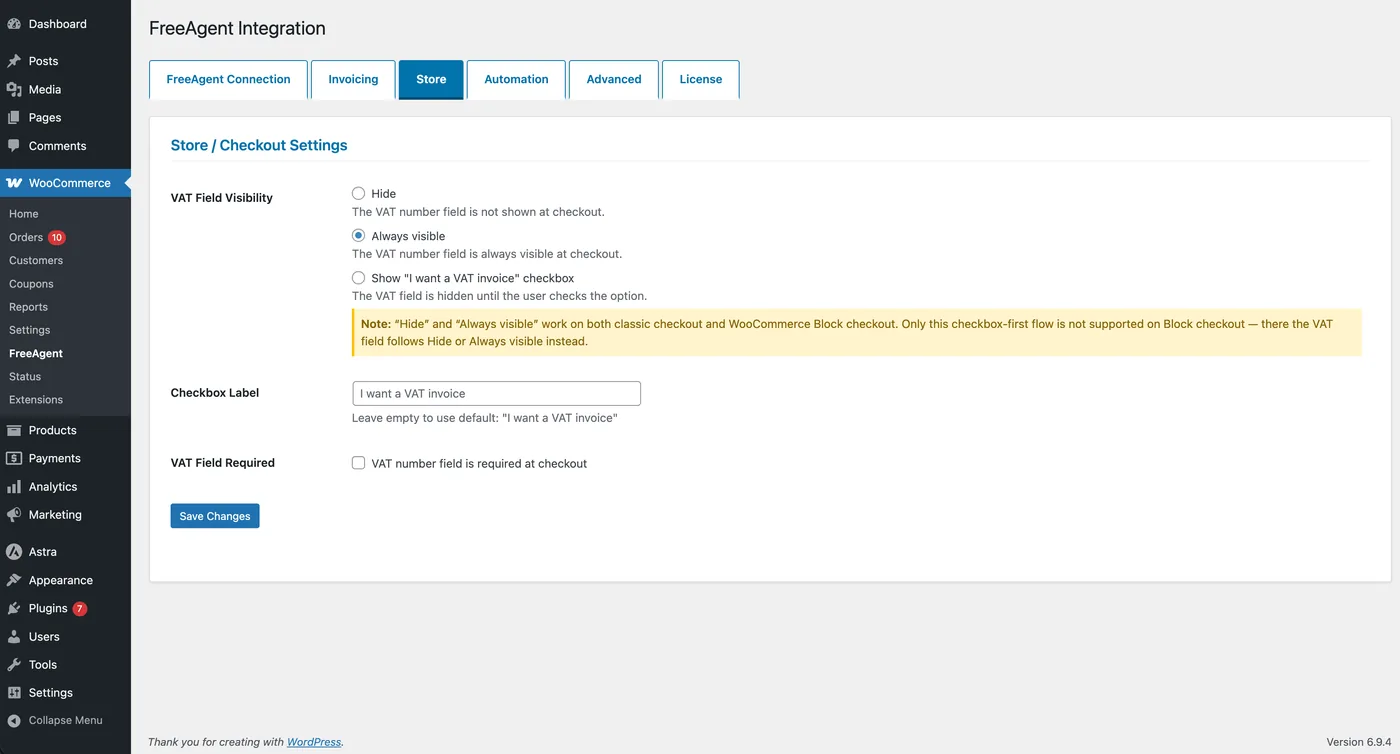
At checkout they can enter a VAT number, or tick “I want a VAT invoice” on classic checkout. The details are saved with the order in WooCommerce.
With one click on the order screen (FREE) or automatically when the order reaches a status you chose (PRO). The number, the PDF and the link are saved on the order.
Features
From the order and the customer's details, through the invoice and the email with the PDF, to payments and credit notes. The FREE or PRO label shows which version has each feature.
The invoice is created from the order screen in WooCommerce. FreeAgent receives the contact, the line items, the VAT and the payment terms, all taken from the order and your defaults.
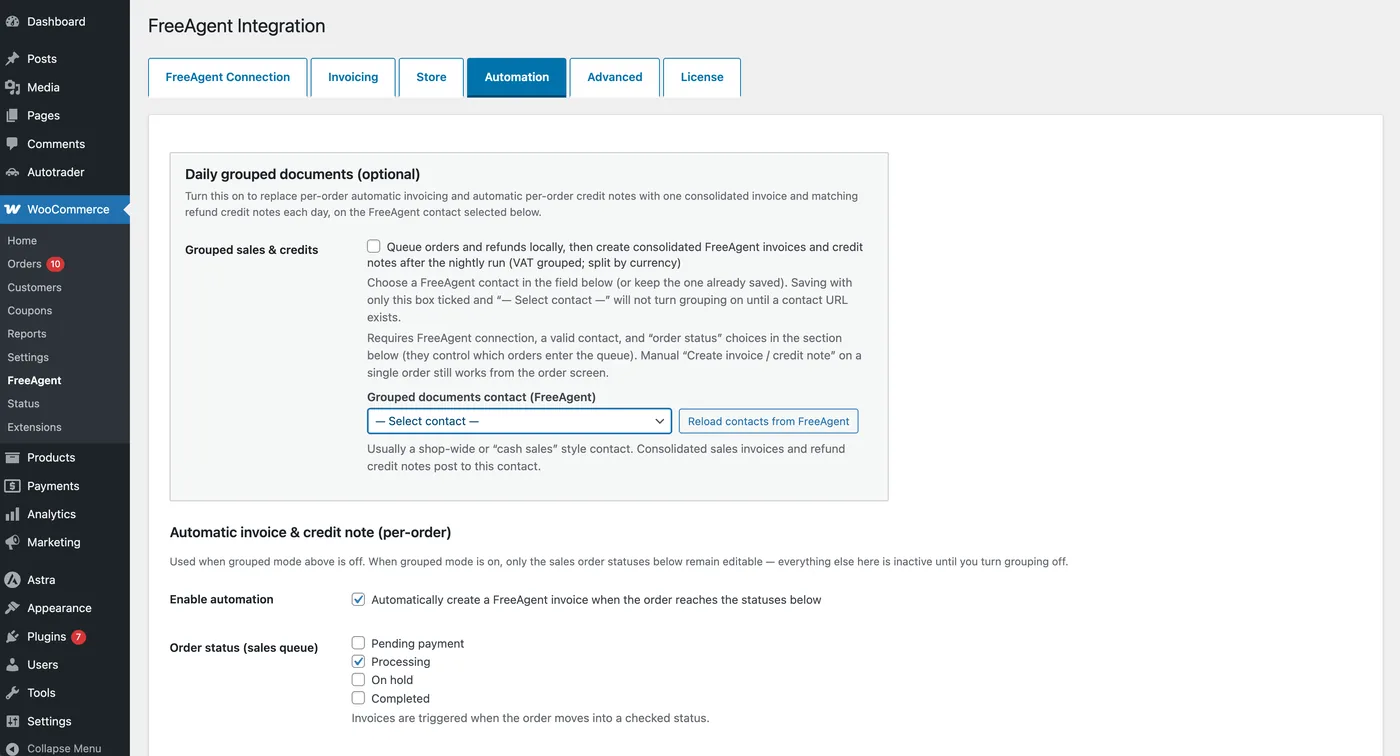
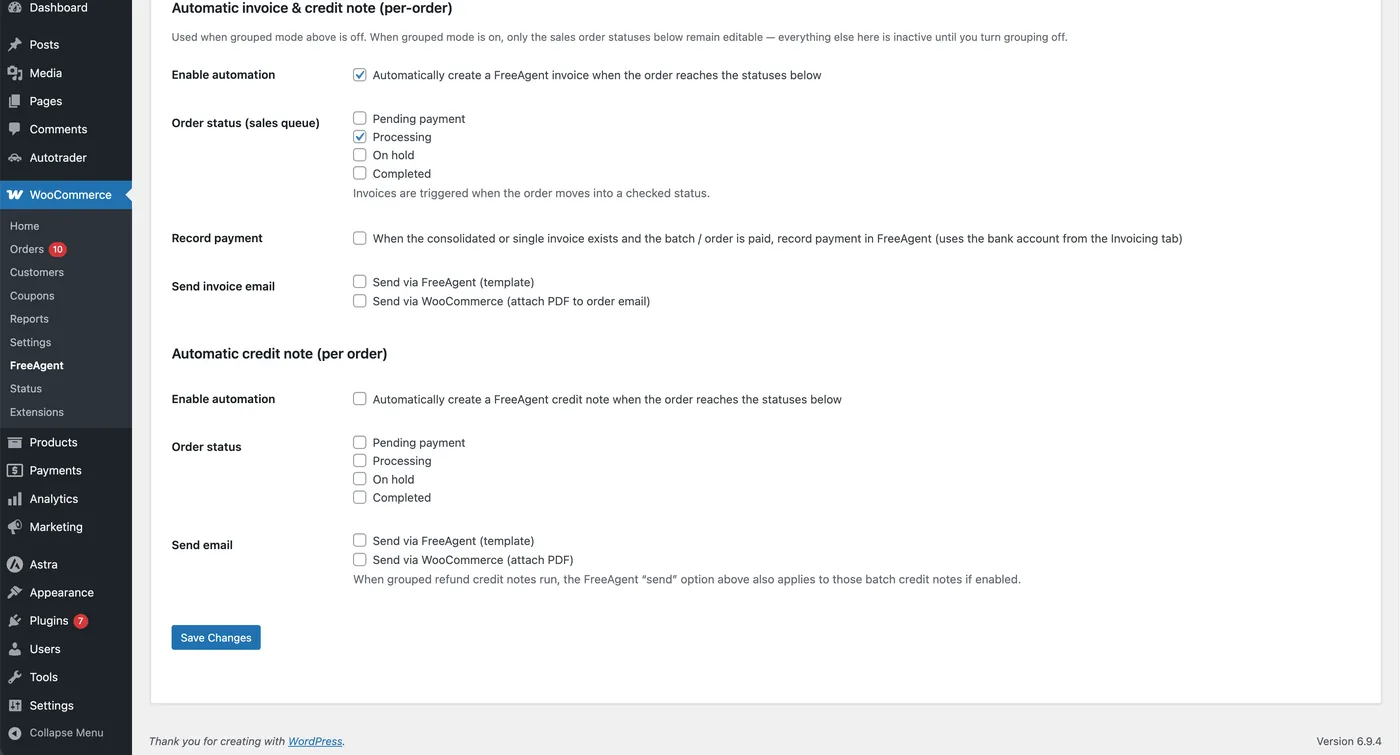
Tick the order statuses that should trigger an invoice. The plugin creates it in FreeAgent and, if you wish, emails it to the customer with the PDF.
High-volume shops can post one consolidated invoice a day instead of thousands of single ones, and have payments booked in FreeAgent as orders are paid. Consolidated documents are never emailed to customers.
VAT is read per line from your WooCommerce tax configuration, and the EC status of the invoice is set from the billing country. Always check the classification with your accountant.
Customers enter their VAT number where it is easiest: at checkout. The plugin matches them to a FreeAgent contact by email address and creates the contact when it does not exist yet.
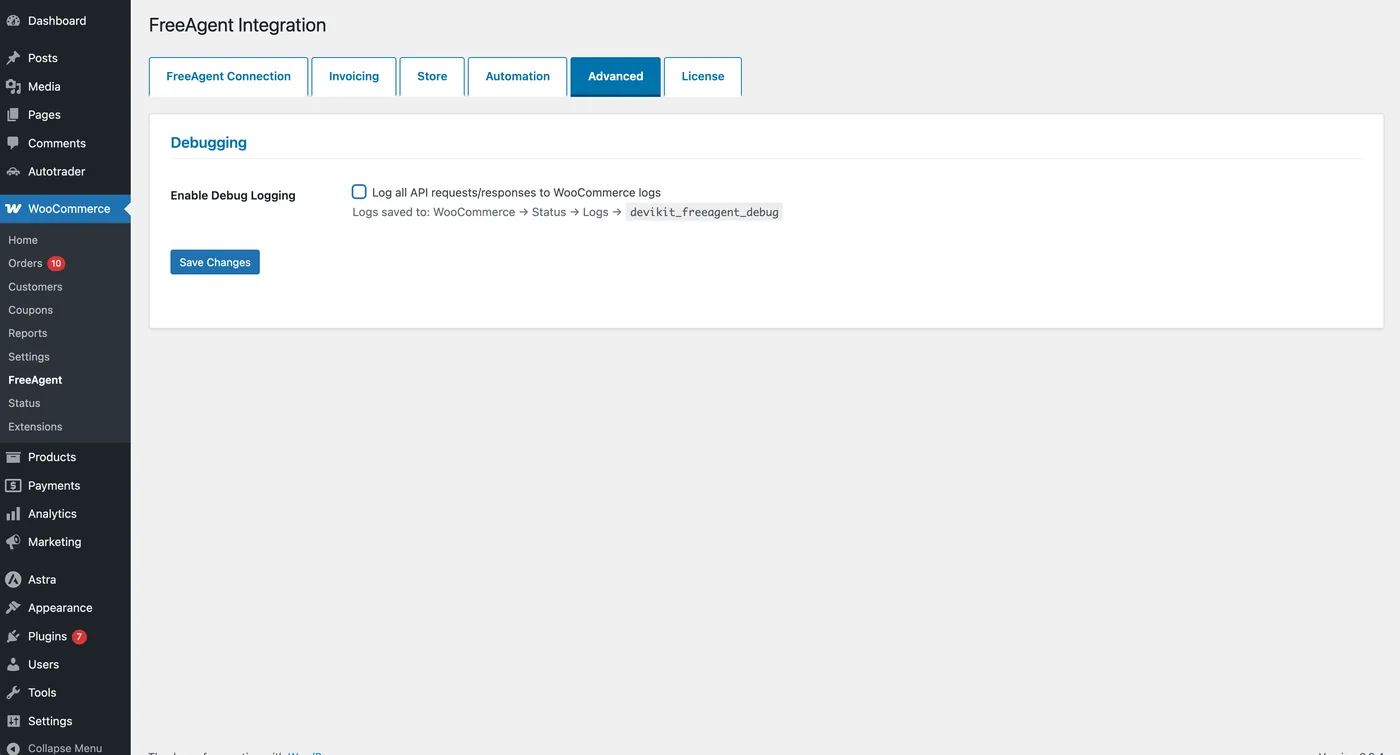
You can see what the plugin sent to FreeAgent and why something failed. It also follows the way modern WooCommerce works.
The illustrations in the cards are simplified. Real screenshots of the settings are in the next section, and every option is described in the documentation.
Screenshots
These are real screens from WooCommerce → FreeAgent. All the setup is in one place, in the tabs you know from WordPress.
Video
In just over eight minutes the video walks through connecting FreeAgent over OAuth, automatic invoices on order status, credit notes for refunds, daily rollups, payment recording, PDF delivery, payment links, VAT, EC VAT MOSS and Reverse Charge, and the API logs.
Reviews
Trusted by over 1,000 website owners. The reviews below are about working with Devikit and our plugins, not only this one.
100% 5-star reviews
Amazing technical support, reported problems are resolved at an express pace. Highly recommended!
Highly recommended!!!
Exemplary cooperation
A partner worth recommending. Great cooperation, meets deadlines and contract terms. Offers ongoing support. Highly recommended.
The only company I've come across that has proper Customer Service. (Apart from mine, too) :)
Highly recommended, very professional company and excellent communication.
Highly recommended, 100% professional service
Excellent service, highly recommended.
Very efficient, always supportive. Professional and effective.
I am very satisfied. I highly recommend. A huge advantage is the commitment and professional advice.
Before you buy
A short answer to what is worth knowing before you add PRO to your basket.
Install the FREE version, which has no time limit and needs no card, connect your shop to FreeAgent and create a test invoice from an order. You add PRO afterwards, and for 30 days you can ask for your money back, no questions asked.
It creates invoices and credit notes and, when a customer matches an existing contact by email address, updates that contact's address, company name and VAT number from the order. It does not delete anything in FreeAgent. Automation runs only after you switch it on, and only for the order statuses you tick.
You can usually create your first invoice in under ten minutes: upload the ZIP file, create the FreeAgent developer app, paste the OAuth Identifier and Secret, and connect.
FREE and PRO
Start with FREE. When invoicing by hand starts to eat your time, add PRO on top of the working installation. One licence covers one website, and you have 30 days to ask for a refund.
FREE Free version
£0no time limit
ZIP file · installs like any WordPress plugin
For shops that want automation
PRO Extension of FREE
£79.00ex. VAT / year · 1 website
The button adds the plugin to your basket · 30-day refund
Time and cost
Invoicing by hand is repetitive work: you open the order, check the details, create the invoice and send it to the customer. With PRO the plugin does it for you when the order status changes.
The sums beside this text are for a shop with 100 orders a month, at £79.00 ex. VAT a year for PRO.
The sums for a shop with 100 orders a month
Who it's for
Daily rollup keeps your FreeAgent ledger clean: one consolidated invoice a day, grouped by VAT rate and currency, instead of thousands of single entries.
The VAT number is captured at checkout and saved to the FreeAgent contact, and the EC status follows the billing country, including Reverse Charge for EU businesses.
A credit note is created when the order reaches Refunded, or from the order screen, and it is tied to the individual order rather than a daily summary.
Reverse Charge for EU B2B orders and EC VAT MOSS for qualifying digital goods, set store-wide or per product and variation.
FreeAgent item types (Products, Services, Hours and more) and income categories map digital sales and bookings to the right place in your accounts.
Invoices arrive in FreeAgent with the contact, VAT, income category and payment already filled in, so there is less to key in and to reconcile.
Documents
From one order you can create the two documents a shop needs in FreeAgent. Both can be created automatically with PRO, and the plugin keeps the numbers and PDFs on the order.
Making Tax Digital
FreeAgent handles the filing. It describes itself as Making Tax Digital-compatible and lets you submit VAT returns directly to HMRC. The plugin does not file anything with HMRC.
What the plugin does is get your sales into FreeAgent complete and correctly classified: line-level VAT rates from your WooCommerce tax settings, the customer's VAT number captured at checkout, the EC status set from the billing country (UK/Non-EC, Reverse Charge or, in PRO, EC VAT MOSS), and credit notes for refunds. Check the classification with your accountant.
What the plugin does, and what FreeAgent does
Comparison
FreeAgent has no WooCommerce connector inside its own dashboard, so the choice is between plugins: the paid extension sold on the Woo Marketplace, Devikit FREE and Devikit PRO. The comparison is based on Devikit's public comparison from August 2026.
| Criterion | FreeAgent Sync for WooCommerce | Devikit FREE | Devikit PRO |
|---|---|---|---|
| Price per year | $79 (Woo Marketplace) | £0 | £79.00 ex. VAT |
| Where you configure it | WordPress | WordPress | WordPress |
| Free version | None | Yes | Add-on to FREE |
| Manual invoicing from an order | Yes | Yes | Yes |
| Automation on chosen order statuses | On order creation, not per status | No | Yes |
| Daily rollup invoices | Yes (summarised mode) | No | Yes |
| Automatic payment recording | Yes (detailed mode) | No | Yes |
| Credit notes on refunds | Daily credit notes in summarised mode | No | Yes, per order |
| VAT number field at checkout | Not in the documentation | Yes | Yes |
| Invoice PDF in My Account | Not in the documentation | Yes | Yes |
| Invoice email with PDF attached | Sent by FreeAgent, not from the store | No | FreeAgent template or WooCommerce email |
| Bulk actions and ZIP export | Not in the documentation | No | Yes |
| EC VAT MOSS and Reverse Charge | MOSS in summarised mode, Reverse Charge on EU services | Reverse Charge yes, MOSS no | Both, store-wide and per product |
| Penny rounding differences | Documented issue, workarounds listed | Warning on the order | Warning on the order, automatic emails held back |
| Invoice quota | None, FreeAgent API rate limits apply | None, FreeAgent API rate limits apply | None, FreeAgent API rate limits apply |
| Support | Woo Marketplace support | No author support | Devikit support |
Sources: Devikit's comparison of 10 August 2026, the plugin's Woo Marketplace listing and documentation, FreeAgent's WooCommerce page and the Devikit documentation. “Not in the documentation” means the vendor's documentation does not describe the feature, not that it is confirmed missing. The Marketplace plugin is priced in US dollars and Devikit PRO in sterling ex. VAT, so the two prices are not directly comparable. A FreeAgent subscription is paid separately in every case. Spotted an inaccuracy? Email hi@devikit.co.uk.
you already buy several extensions on the Woo Marketplace and want one renewal date and one support desk. Its summarised daily-invoice mode is its strongest feature, and unlike Devikit FREE it comes with author support. Devikit PRO also does daily rollups, but billing, updates and support in your existing Woo account are a real convenience.
you create a handful of invoices a week by hand and want to start at no cost, with a VAT number field at checkout and PDFs in My Account. It has no automation, no credit notes, no store-sent emails and no author support.
you want invoices on order status, credit notes tied to each refund, a daily rollup that still lets you invoice single orders, emails with the PDF attached from WooCommerce, and a price in sterling. Partial refunds that do not move the order to Refunded need a manual credit note.
Installation
Setup takes about ten minutes. Below is the short version, and the documentation describes every screen.
FAQ
No. FreeAgent's own WooCommerce integration page describes the connection as an extension you upload to WordPress, so there is nothing to switch on inside your FreeAgent account. Plugins such as FreeAgent WooCommerce from Devikit are installed in the shop and connect to FreeAgent over its OAuth API. Because they sit in the shop, they can use what FreeAgent cannot see from outside: the VAT number at checkout, your WooCommerce tax settings, the billing country and refunds.
Yes. The FREE version from Devikit costs £0, has no time limit and needs no card. It creates invoices manually from the order screen, matches or creates FreeAgent contacts by email address, reads VAT per line from your WooCommerce tax settings and adds a VAT number field at checkout. You download the ZIP file from devikit.co.uk and upload it in WordPress.
Install the plugin, then create a developer app at dev.freeagent.com (My Apps, then Create New App). Paste the Redirect URI shown in the plugin into the app, copy the OAuth Identifier and Secret into WooCommerce → FreeAgent → FreeAgent Connection, click Save Credentials, then Connect to FreeAgent, and approve access. Each website needs its own app, and creating one is free.
Open the order in WooCommerce and click Create Invoice in the FreeAgent panel. The plugin creates the invoice in FreeAgent from the order, using the defaults from the Invoicing tab. The order then shows the invoice number, a View in FreeAgent button and a Download PDF button. If FreeAgent returns an error, the message is shown with a Retry button.
Yes, with PRO. The invoice is created when the order reaches any status you tick: Pending payment, Processing, On hold, Completed or a custom status. Cancelled, Refunded and Failed are excluded. With FREE you create each invoice by hand from the order screen.
FREE covers manual invoicing, the OAuth connection, contact matching, line-level VAT, UK/Non-EC and Reverse Charge defaults, the VAT number field at checkout, PDFs on the order and in My Account, payment terms, the bank account and API logs. PRO adds automatic invoices on order status, automatic credit notes, daily rollup mode, automatic payment recording, emails with the PDF attached, bulk actions, custom invoice references, income categories, online payment links, EC VAT MOSS and priority email support.
No. PRO is an add-on and needs the FREE plugin installed and active. That way the FreeAgent connection and your settings are configured only once.
FREE costs £0 and does not expire. PRO costs £79.00 ex. VAT per year and covers one website, 12 months of updates and priority email support. Buying several licences or Devikit plugins in one order earns a volume discount, starting at 10% for two. A FreeAgent subscription is paid separately.
PRO features work only with a valid licence, so automation and the other PRO tools stop until you renew. FREE keeps working, and the invoices already created stay in FreeAgent.
FreeAgent describes itself as Making Tax Digital-compatible and lets you submit VAT returns directly to HMRC. The plugin does not file anything with HMRC. Its job is to get your sales into FreeAgent correctly, with line-level VAT, the customer's VAT number and the EC status. We recommend a few test orders before you switch automation on, and a check of the classification with your accountant.
FREE sets the EC status of the invoice from the billing country: UK/Non-EC by default, and Reverse Charge for EU billing countries when a VAT number is captured. PRO adds EC VAT MOSS, with a store-wide default and per-product and per-variation flags for qualifying EU digital goods. These rules are a best-effort default based on WooCommerce data, so check them with your accountant.
Yes. The VAT number field works on classic and Block checkout. You can hide it, always show it or make it required, and on classic checkout you can reveal it only after the customer ticks “I want a VAT invoice”. On Block checkout the field follows the Hide or Always visible setting.
Yes, with PRO. A credit note is created automatically when the order reaches the Refunded status, or from the order screen once refunds exist. Partial refunds that do not move the order to Refunded do not trigger an automatic credit note, so you create those from the order screen.
Yes. The plugin adds an Invoices tab to My Account, where logged-in customers can download PDFs for their own orders. With PRO, credit note PDFs are there too.
Yes. The plugin is compatible with High-Performance Order Storage (HPOS), and the VAT number field works on classic and Block checkout. The optional “I want a VAT invoice” checkbox is available on classic checkout only.
A PRO mode for high-volume shops. Instead of one invoice per order, the plugin queues orders and refunds and posts one consolidated sales invoice per day, grouped by VAT rate and currency, plus matching credit notes, to a FreeAgent contact you choose. While it is on, per-order automation is switched off, and the consolidated documents are not emailed to customers.
WooCommerce and FreeAgent round at different points. The plugin shows a total mismatch warning on the order and in the orders list, and holds back the automatic customer email (PRO) until you resolve it. To reduce the chance, set WooCommerce to two decimal places.
Documents are created and stored in FreeAgent. The plugin sends FreeAgent the data needed for the document: the customer's name, address, email and VAT number, plus the order's line items, amounts and VAT rates. The invoice number is saved with the order in your shop, and PDFs are fetched from FreeAgent on demand.
Invoices created earlier stay in FreeAgent. Deactivate the previous plugin before you switch on automation, so that two plugins do not create an invoice for the same order, then check the settings with a test order. If you are unsure, email us and we will suggest how to switch without a gap in your invoicing.
WordPress 5.8 or newer, WooCommerce 5.0 or newer, PHP 7.4 or newer, and a FreeAgent account with a developer app for the OAuth connection. PRO requires the FREE plugin.
The documentation describes every tab and is on devikit.co.uk. Email your questions to hi@devikit.co.uk, and we usually reply within a few hours. PRO customers get priority email support.
Keep reading
Start with the FREE version or add PRO to your basket straight away. You can install the plugin in about ten minutes, and if it does not save you time, we refund you within 30 days.
30-day refund · priority email support with PRO · hi@devikit.co.uk
Cookies
We use cookies to remember your choice and to measure traffic on the site. Analytics only switch on after you agree, and refusing does not limit how the site works. Cookie policy
Cookie settings
Needed for the site to work and to remember your consent.
Traffic measurement with Google Analytics 4. Off until you consent.